GitHub Copilot vs Cursor for TypeScript Development
Cursor's full editor control beats Copilot's reach for TypeScript refactors.

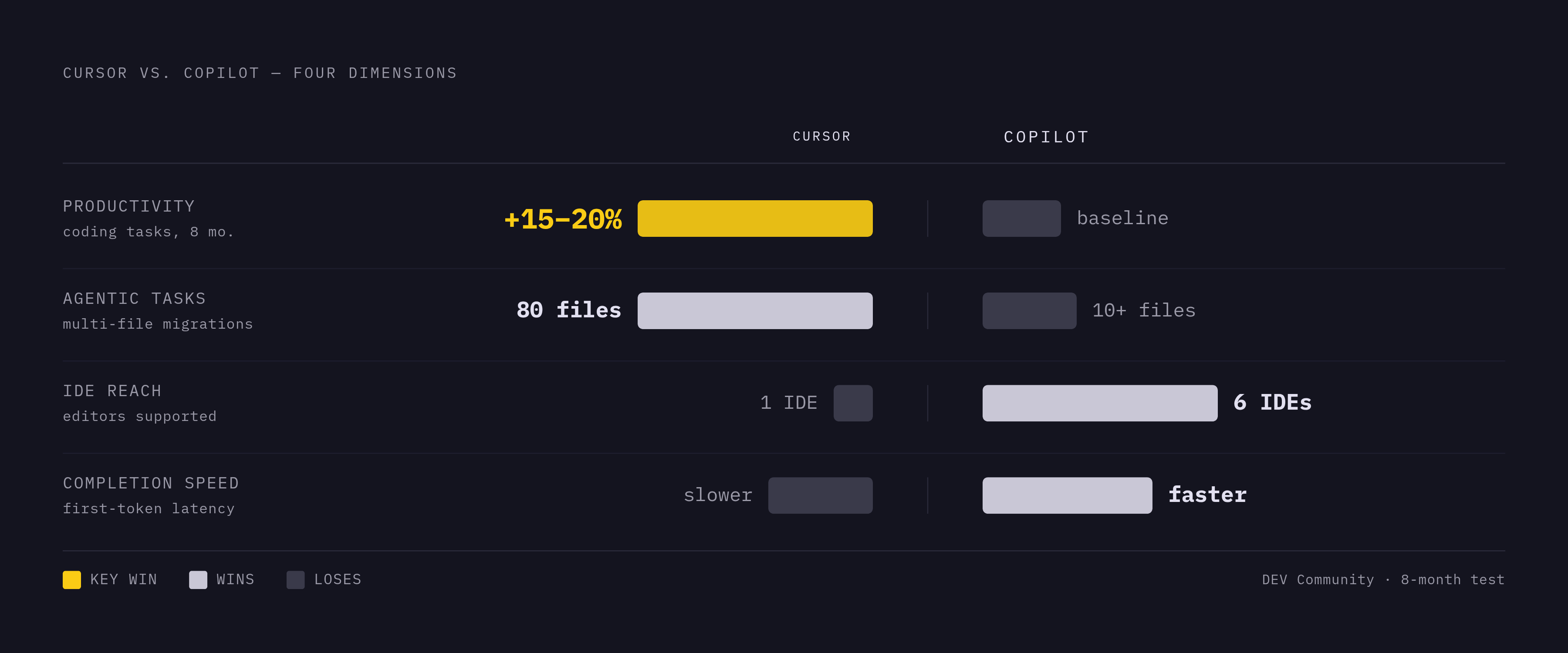
Cursor is a fork of VS Code, rebuilt from the ground up with AI treated as infrastructure rather than a bolted-on feature. Copilot is an extension that installs into whatever editor a developer already uses, working within the constraints that editor sets. That distinction, not pricing tiers or marketing copy, is what decides what each tool can actually do for TypeScript work. Cursor's control over the full editor stack lets it build agentic features and deep context awareness that a plugin architecture simply cannot replicate, no matter how well-engineered the plugin is. Copilot's approach trades that ceiling for reach: it runs inside VS Code, JetBrains, Neovim, Visual Studio, Xcode, and Eclipse, six IDEs total, with zero migration cost for teams already settled into one of them. A July 2026 Superblocks test framed the split cleanly: Cursor's full control over its own editor is what lets it push agentic features deeper, while Copilot's advantage is a frictionless fit into whatever setup already exists.
TypeScript makes this split matter more than it would for a looser language. Its type system hands an AI tool structured, checkable context: prop shapes, generic constraints, and import graphs that spell out how files depend on one another. A tool with deep access into that structure can use it more fully than one that only sees a window of open files. Fireship's Jeff Delaney, analyzing GitHub Octoverse data, wrote: "TypeScript won because AI made type errors the #1 productivity killer… TypeScript gives you a safety net". Both tools benefit from that safety net. They just don't exploit it the same way, and the rest of this comparison is really an account of that difference playing out across specific TypeScript tasks.
Cursor's Tab model versus Copilot's inline model for TypeScript completions
Autocomplete is where the architectural gap first becomes something a developer can feel, keystroke by keystroke. Cursor's Tab model predicts chains of edits that span multiple lines and multiple files at once. Copilot's inline model predicts idiomatic single-line or short-block completions. For a TypeScript developer renaming a prop or adjusting a function signature, those are not versions of the same task; they're different tasks entirely.
Cursor's Tab model doesn't stop at the cursor's current line. Change one identifier and Cursor's Tab model proposes a chain of suggested edits across nearby lines and even neighboring files, treating the edit as a ripple rather than an isolated keystroke. An eight-month DEV Community test running on a large TypeScript monorepo gave this a concrete shape: renaming a prop on a React component, Cursor proposed updates at the call sites with a single Tab press, and it correctly predicted complete function implementations, generic constraints included, roughly 70% of the time, matching the error-handling patterns already present in the surrounding codebase. That's a meaningfully high hit rate for a task that used to mean manually chasing every call site by hand.
It isn't free of risk. The same test found that a notable share of Cursor's multi-line suggestions carried subtle issues that would introduce bugs if a developer accepted them without reading closely. Speed compounds the reach, and reach without scrutiny gets expensive.
Copilot takes a different bet. Its training leans toward the most common, most idiomatic answer, which makes it strong on Express middleware, React components, SQL queries, and test assertions, the bread-and-butter patterns that show up across thousands of repos. Its exposure to that huge cross-section of GitHub code can also surface an approach a developer hadn't considered, even without reaching across files to do it. On raw speed, Copilot has the edge: tech-insider.org's comparison found its first-token latency meaningfully lower than Cursor's Tab model, so the practical split is speed to Copilot, depth to Cursor. Both are in the high-quality tier for TypeScript specifically, because TypeScript has such heavy representation in the training data both models draw from.
Multi-file refactors and type consistency across a codebase
Multi-file refactoring is where the two tools stop looking like variations on the same idea and start looking like different categories of product. Cursor's codebase index and its Composer agent can hold type relationships across an entire project in a way that Copilot's context window and workspace indexing were not built to do.
Cursor indexes an entire project the moment it's opened, mapping file structure, types, function signatures, and import graphs into a single index that powers autocomplete, chat, and multi-file editing alike. In the DEV Community test, a large project finished indexing in roughly 90 seconds. That index is what makes Cursor's Composer 2 autonomy slider workable in practice: a developer can set it to touch one file at a time with per-diff approval, apply changes across many files under a single review, or let it run fully autonomously. For an 80-file framework migration, Tembo's comparison found the fully autonomous mode is the only realistic option, since reviewing 80 individual diffs defeats the purpose of automating the migration.
Copilot's workspace indexing, rolled out through 2025, gives it a working awareness of open files, recent edits, and general project shape, but that awareness runs shallower once a task spans the whole codebase. The DEV Community test asked both tools to trace a cross-cutting concern, rate limiting logic scattered across a project, and Copilot found some of the relevant occurrences but not all of them. That's a direct function of a fixed context window that caps how much of a large codebase the model can hold at once, an architectural ceiling rather than a sign the underlying model is weaker.
Copilot's agent mode still handles a solid range of multi-file work: renames, adding a field and updating the serializers that depend on it, the kind of contained, well-scoped change that doesn't require holding the whole project in mind at once. Both the Superblocks and Tembo evaluations describe it as more conservative and more workspace-bound than Composer, a fair characterization rather than a knock. The gap shows most clearly at scale: on agentic tasks touching ten or more files, tech-insider.org reported Copilot's agent completing comparable work at lower success rates than Cursor's agent. Cursor tends to keep TypeScript types consistent across every file it touches during a refactor. Copilot can do the same on smaller jobs, but its edge over Cursor narrows considerably once the file count climbs.
Codebase indexing and GitHub integration as Copilot's advantages over Cursor
Copilot's case doesn't rest on inline completions alone. Copilot's value for TypeScript teams isn't just inline completions: it's the only tool that follows a piece of code from the editor, through PR review, into the CLI, and on into GitHub Actions, and its GitHub-native security integration is a concrete advantage Cursor doesn't replicate.
Some of that comes down to context Cursor structurally cannot reach: GitHub issues, PR descriptions, repo metadata, CI run history, the Superblocks test calls this out directly as context available to Copilot and not to Cursor. Pull request review compounds the advantage. Copilot's coding agent and review features run natively inside GitHub, so the same AI that proposed a piece of code can also review the pull request it lands in. Cursor's agent operates inside the editor and isn't triggered by GitHub webhooks or PR events unless a team wires that up externally, Tembo found. GitHub Copilot CLI reached general availability in February 2026, extending the assistant into the terminal without ever stepping outside GitHub's ecosystem.
Security is where the case sharpens further. Copilot integrates natively with Dependabot and CodeQL, catching insecure patterns the AI itself generated before they ever reach a pull request. Cursor leans on external linters and manual review to catch the same class of problem. Both tools have had their own security incidents, CamoLeak on the Copilot side and a case-sensitivity bypass on Cursor's, and both hold SOC 2 Type II certification as of 2026. Where they genuinely diverge is in IP indemnification and data retention policy, and that divergence matters more to a legal team than a shared certification badge does.
For an enterprise running proprietary TypeScript code, data residency is the sharpest argument in Copilot's favor. Copilot Enterprise can keep traffic entirely inside a customer's Azure tenant. Cursor's Privacy Mode promises zero data retention when enabled, but its privacy model relies on trust in cloud API routing rather than architectural guarantees comparable to tenant isolation. For a security team writing policy around a codebase full of internal business logic, that's not a small distinction.
IDE breadth closes out Copilot's structural case. It runs in VS Code, JetBrains, Neovim, Visual Studio, Xcode, and Eclipse. Cursor's AI features exist only inside Cursor itself. Any team standardized on JetBrains, which covers a large share of backend and enterprise TypeScript shops, simply doesn't have Cursor as an option, full stop.
Pricing and the credit-billing shift for a TypeScript team
The sticker prices look like a clean split: Copilot Pro runs $10 a month, Cursor Pro runs $20. Half the cost sounds like half the decision, but both products moved to usage-based credit billing on June 1, 2026, confirmed across multiple sources including tech-insider.org and Superblocks, and the sticker price now buys a monthly AI-credit allotment, with premium model use drawing credits down faster, which changes what the sticker price actually buys. A developer running Cursor's Composer against an 80-file migration every week and a developer using Copilot for occasional inline suggestions are no longer paying for the same thing just because they're on the same named tier.
Copilot's pricing spans six tiers: Free, Pro, Pro+, Max, Business, and Enterprise, running from no cost at the bottom to a per-user enterprise rate at the top. Cursor's structure is simpler on paper: a limited free Hobby tier, Pro at $20 a month with 500 fast premium requests included, and Teams at $40 per user per month, with an Ultra tier also listed in tech-insider.org's reporting. Copilot's free tier caps completions per month but is generally more usable day to day than Cursor's free Hobby tier, the DEV Community test found.
For a team already paying for GitHub seats, Copilot reads as an incremental add-on rather than a brand new expense line, which matters more in budget conversations than the raw dollar figure does. One further data point belongs here without extrapolation: SpaceX completed its acquisition of Cursor's parent company, Anysphere, on August 14, 2026. Every pricing tier remained unchanged as of that date, though Cursor made a significant billing change on August 24, 2026. What that ownership change means for Cursor's pricing or product direction going forward isn't something the current record settles, since the brand's direction now sits outside Anysphere's own hands.
Which tool fits which TypeScript developer: the conditional verdict
Cursor is the higher-ceiling tool for writing and refactoring TypeScript. Copilot is the better fit once the work extends past the editor into GitHub's development lifecycle, or once an organization's data controls demand enterprise-grade guarantees. Which one is correct depends on which of those descriptions matches the actual shape of a developer's week.
Cursor makes sense for a developer whose primary work is writing and refactoring TypeScript inside a single editor, running multi-file changes, framework migrations, or large-scale refactors on a regular basis, and who wants to switch between frontier models on a per-request basis. It also makes sense for anyone already living in VS Code, since Cursor carries over existing extensions and keybindings with no relearning curve. The eight-month DEV Community test put a number on the payoff: Cursor users measured roughly 15 to 20% more productive on raw coding tasks than Copilot users, the strongest individual-developer productivity case anywhere in the available reporting. The Cursor SDK, launched April 29, 2026 and written in TypeScript, extends that reach further, letting teams trigger agents programmatically from a CI/CD pipeline, a backend service, or an embedded tool rather than only from inside the editor, which matters to growth engineers building automation on top of the agent rather than just using it interactively. Rippling appears among the early adopters cited in current reporting, and Cursor itself runs on Notion internally, and the relationship runs the opposite direction from what's sometimes assumed.
Copilot fits a different set of circumstances just as clearly. A team standardized on JetBrains or another non-VS Code editor should choose Copilot. A security team requiring Azure-tenant data residency or GitHub-native audit logging has a real, structural reason to pick Copilot over a promise of zero retention. A team whose TypeScript code flows through GitHub Actions and wants AI reviewing pull requests in the same place it generated the code gets that only from Copilot, and cost-constrained teams get a lower floor to start from. Copilot carries the weight of distribution: it has a paid subscriber base several times the size of Cursor's, giving it more community-documented patterns, more TypeScript examples baked into what the model has seen, and a lower bar for getting an entire organization onto the tool at once. For a shop already built around GitHub, Dependabot and CodeQL running natively alongside Copilot keeps security review inside the same pipeline that generates the code in the first place, rather than bolting a separate review step on afterward.
The strongest case against defaulting to Cursor is a simple one: it's the most convenient tool only for developers already in VS Code. Outside that editor, Copilot is the only option on the table, not one of several. The Superblocks test summarized the tradeoff without much ambiguity: Copilot wins on task resolution rate even where Cursor wins on raw speed. A METR controlled trial cited by secondtalent.com adds a useful check against overconfidence in either direction. Workflow fit deserves at least as much weight in this decision as any single benchmark score.
Cursor's pace of change cuts both ways for anyone weighing long-term stability. Cursor 3 launched April 2, 2026, with a complete interface redesign built around managing multiple AI agents in parallel, and Cursor 3.1 reached stable release on April 13, 2026. That speed is an asset for early adopters who want the newest agentic capabilities as soon as they ship. It's a risk for teams that need a settled, predictable tool underneath a production codebase. Which of those two developers a reader happens to be is, in the end, the entire decision.
Sources
- Cursor vs GitHub Copilot 2026: My Verdict After Testing | Superblocks
Provided the framing of Cursor's full editor control enabling deeper agentic features versus Copilot's frictionless integration, plus pricing details and task resolution rate comparisons.
- Cursor vs GitHub Copilot 2026: Which AI Tool Is Better? – Tembo
Supplied the 80-file migration example illustrating why fully autonomous mode is necessary for large refactors, and characterizations of Copilot's agent as more conservative and workspace-bound.
- Cursor vs GitHub Copilot (2026): We Used Both Daily for 8 Months - DEV Community
Provided the eight-month monorepo test data including the 70% hit rate on generic constraints, 90-second indexing figure, cross-cutting concern tracing results, and 15–20% productivity differential.
- Cursor vs Copilot 2026: $20 vs $10, $29B Valuation [Tested]
Supplied first-token latency comparison, agentic task success rates at scale, and the Ultra pricing tier detail.